BLOG
How to Keep Enterprise Integrations Stable During an SAP S/4HANA Migration
11 November 2026 | Lukas Peter
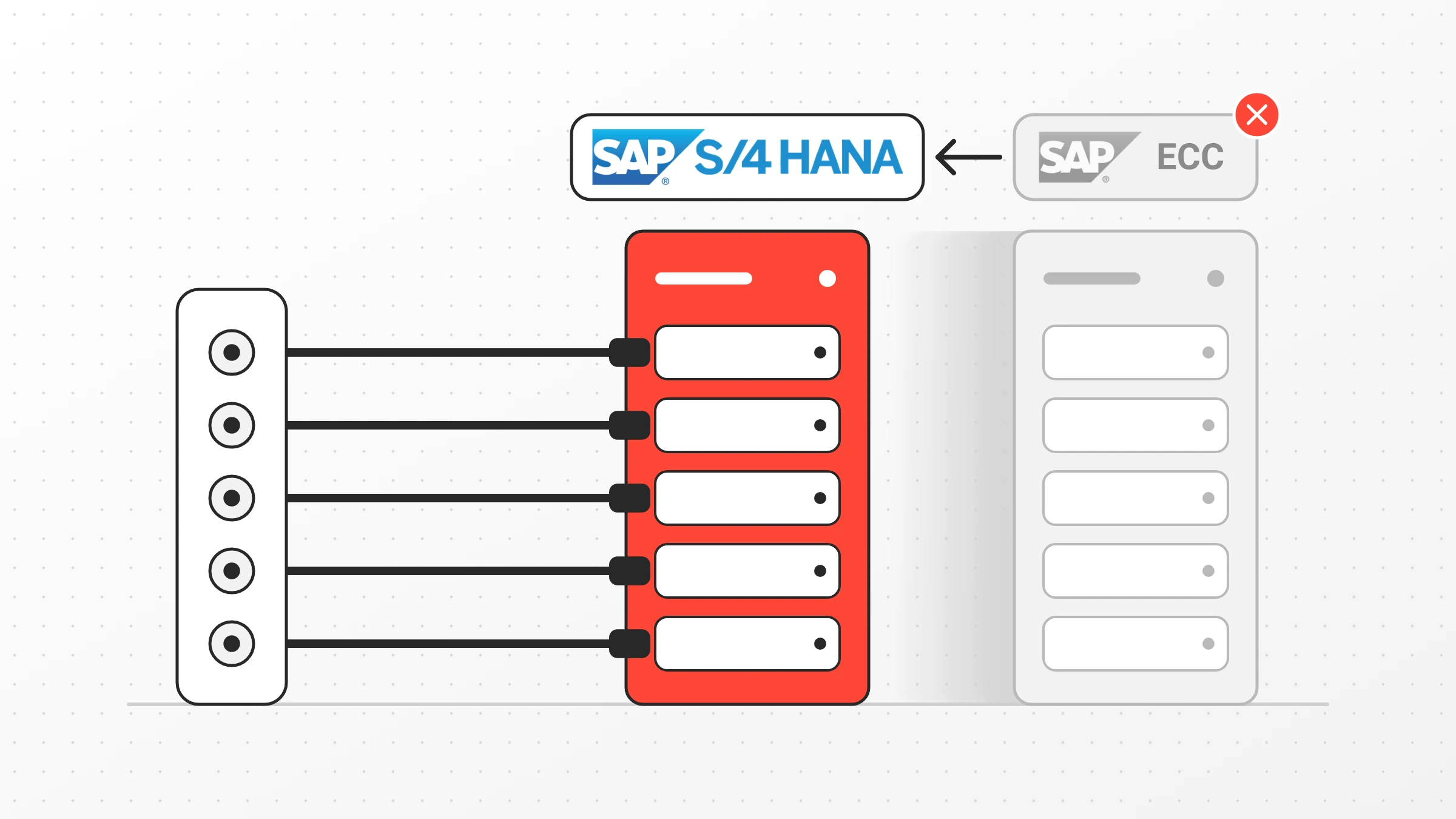
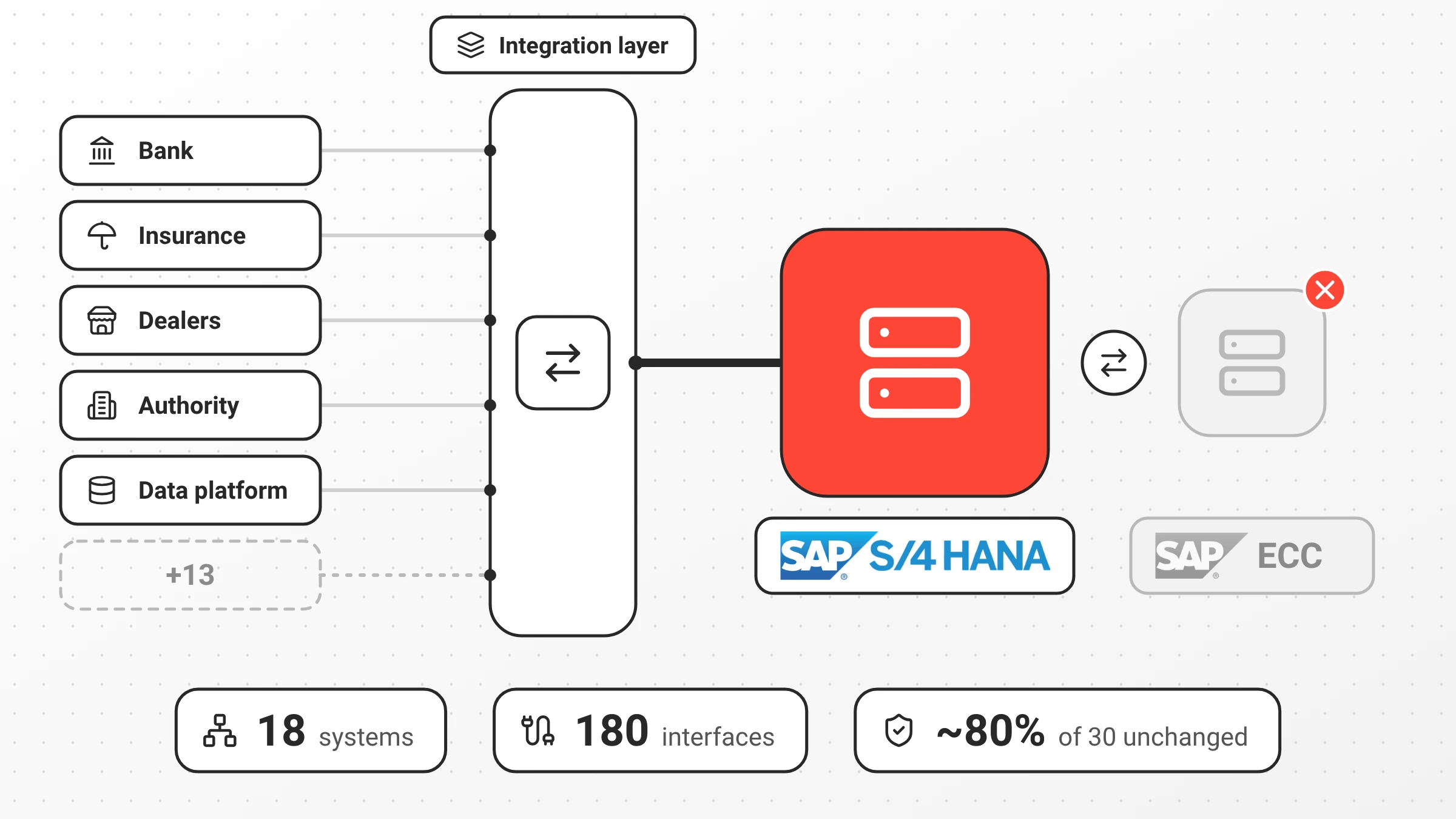
Replacing SAP ECC with SAP S/4HANA affects every system that exchanges data with the ERP platform. In one migration from SAP ECC on-premise to SAP S/4HANA in the RISE with SAP (SAP RISE) cloud environment, 18 systems and external parties exchanged data through 180 interfaces in Scheer PAS. 30 of these interfaces already existed and had to keep their data structures, although the SAP system underneath was replaced.
TL;DR
An SAP migration is also an integration project. When connected systems talk to SAP through an integration layer, that layer can absorb much of the change. For most of the 30 existing interfaces (roughly 80%) adjusted mappings kept each interface exactly as it was, and the calling systems did not notice the switch.
SAP migrations are usually planned around SAP itself: data migration, custom code, new processes. The systems around it get less attention, although every change to SAP’s data structures reaches them. In this project, those included dealer systems, an enterprise data platform, banks, insurance companies, public authorities, and an online shop.
Why is an SAP S/4HANA migration also an integration project?
An SAP S/4HANA migration is also an integration project because every system that exchanges data with SAP depends on its data structures and interfaces. Replace the ERP system, and each of those connections must be checked, adapted, or rebuilt.
In this project, 18 systems and external stakeholders exchanged data through Scheer PAS, including SAP S/4HANA itself, the enterprise data platform (formerly the data warehouse), databases, dealer systems, parent and national companies, agencies, public authorities, service providers, HR and user-management systems, blob storage, job scheduling, an online shop, banks, insurance companies, and mobility service providers.
Few of them can adapt to the migration’s schedule. A bank, an authority, or an external agency rarely adapts its interface because one of its partners migrates its ERP system.
What did this SAP S/4HANA migration involve?
This SAP S/4HANA migration moved the ERP platform from SAP ECC on-premise to SAP S/4HANA in the SAP RISE cloud environment. Master data was migrated and synchronised, and the integration and interfaces were implemented with Scheer PAS. The master data transfer was first used for the migration itself and is still running today: it keeps master data from SAP S/4HANA in sync with the enterprise data platform.
In total, 180 interfaces were implemented, 30 of which already existed before the migration. The 150 new interfaces connected a wide range of systems directly with SAP S/4HANA. That is a figure from this project, not a benchmark. How many interfaces a migration involves depends on how many systems a company connects and how it scopes its interfaces.
The project at a glance
| Aspect | In this project |
|---|---|
| Migration | SAP ECC on-premise to SAP S/4HANA (SAP RISE) |
| Systems and external parties | 18 |
| Interfaces implemented | 180 |
| Interfaces built before the migration | 30. For most of them (roughly 80%), adjusted mappings kept the interface unchanged. |
| Communication | REST, OData, SOAP, JMS, SQL, RFC |
| Data formats | XML, JSON, flat files |
| Robotic process automation | UiPath |
How can companies protect existing interfaces when replacing SAP ECC?
Companies can protect existing interfaces during an ERP replacement by having the systems behind them talk to an integration layer instead of SAP itself. That does not guarantee that every interface stays unchanged, but it gives the migration one place to absorb the differences. 30 interfaces had already been built in Scheer PAS before the migration. For those, the task was to keep the data structure the connected systems expected, even though the SAP system underneath changed.
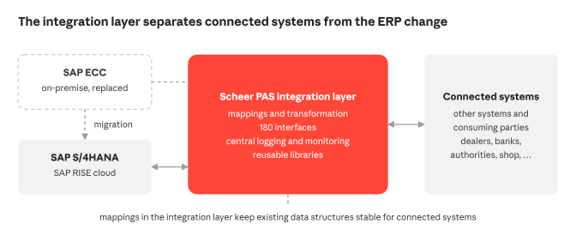
For most of the 30 (roughly 80%) the team adjusted the mappings in Scheer PAS so that each interface behaved exactly as it had before the switch. The calling systems did not notice the migration at all. The interfaces to a bank within the group show why that mattered: the bank runs a large number of legacy applications, so its interfaces had to stay exactly as they were. For a few interfaces, fundamental changes to the SAP data structures made this impossible. There, the team first tried to work only the necessary changes into the existing interfaces and built completely new interfaces where even that was not possible.
That is the core argument for an integration layer during a migration. Each interface has a contract with the systems that use it. If the contract holds, the migration stays as an SAP project for those systems. If it breaks, every consumer becomes part of the migration. A stable structure does not remove the need for end-to-end tests, because values and meanings can still change with SAP S/4HANA. But it turns a rebuild into a regression test.
How do you integrate many different technologies during an SAP migration?
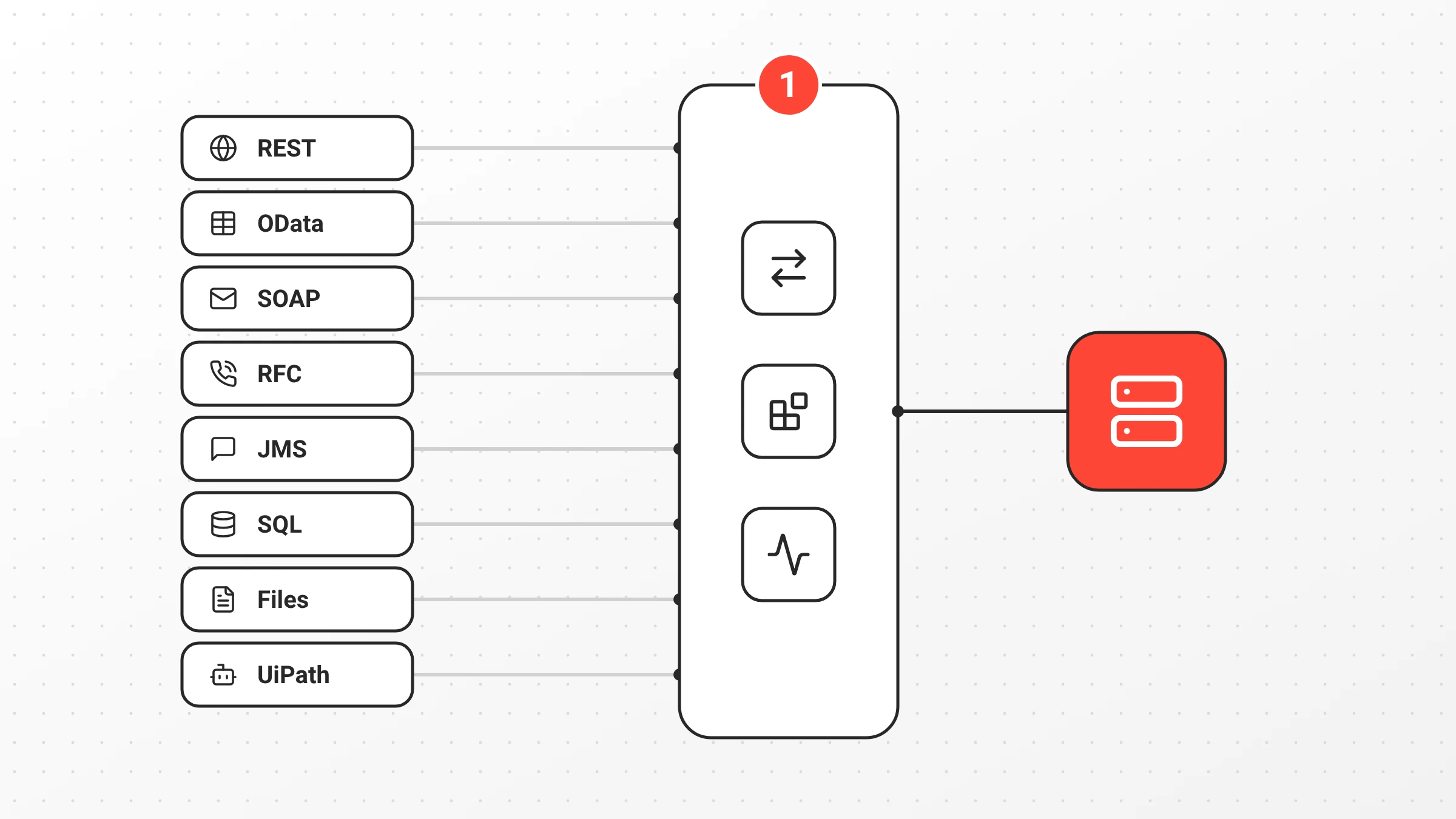
Many different technologies are easier to manage during an SAP migration when all of them connect through one integration layer. Each system keeps its own protocol and format. The integration layer translates between them, so the migration deals with one set of mappings, patterns, and monitoring instead of one per technology.
In this project, that covered five kinds of connections: modern APIs over REST and OData, established enterprise interfaces such as SOAP services and SAP Remote Function Calls (RFC), message-based communication over JMS, SQL access to databases, and file-based exchange. Data arrived as XML, JSON, or flat files, and UiPath was used for robotic process automation (RPA).
Recurring integration patterns and reusable libraries meant that the same kind of problem did not need a separate solution for every connection.
Why do logging, monitoring, and reusable design matter in an SAP migration?
Logging, monitoring, and reusable design matter in an SAP migration because an interface that works on go-live day still has to keep working afterwards. The project established central, consistent logging and monitoring across the interfaces, providing a central place to observe and track interface activity, regardless of protocol.
Integration patterns and recurring designs were applied across connections, and common functions were bundled into reusable libraries. With 180 interfaces, that matters. A known pattern does not have to be reinvented for every connection, and a change to a library reaches every interface that uses it, which is also why library changes need versioning and regression tests.
Why does agentic orchestration need a controlled integration layer?
Agentic orchestration needs a controlled integration layer because an AI agent working across SAP and connected systems should follow the same rules as every other caller. An agent that calls SAP directly bypasses the mappings, validation, and logging every other consumer relies on. It can write data in a form that a bank interface, a dealer system, or the enterprise data platform does not expect, without a central log entry showing where it came from.
The migration produced a foundation an agent could build on: defined interfaces, mappings, central logging, and reusable libraries. Agentic orchestration can coordinate tasks across several systems, while the integration layer handles the technical communication with them. Patterns and libraries like these can serve as controlled building blocks for agents, instead of each agent building its own connection. In Scheer PAS, agents built with PAS Code are a feature of a service: they have no endpoint of their own and can only be reached through that service.
No AI agents were used in this project. The integration foundation described here is a precondition for using them later.
What guardrails do AI agents need across SAP and connected systems?
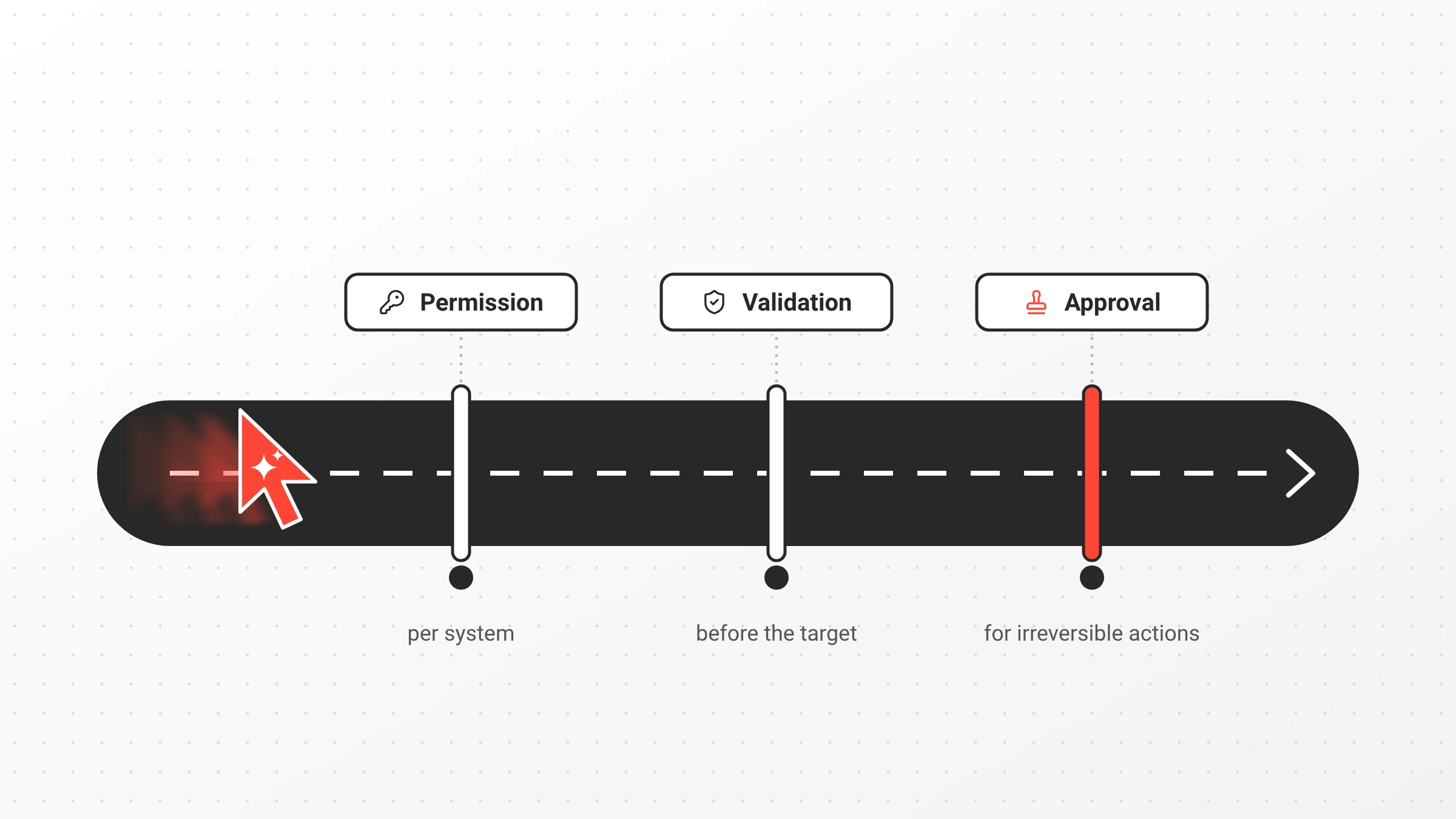
AI agents working across SAP and connected systems need guardrails that protect interface contracts, because data an agent writes in the wrong form can reach every consumer of an interface. Three matter most here.
Permission boundaries per system.
An agent should only call specific operations on specific systems. For example, an agent might be allowed to read order data from SAP S/4HANA, but not to write to the bank or insurance interfaces.
Validation before the target system.
Data should be validated and transformed in the integration layer before it reaches SAP or any connected system, against the same structures the existing consumers expect.
Approval for irreversible actions.
Postings, payments, or data sent to external parties should wait for human approval.
How Scheer PAS defines which operations an agent may execute, and the general requirements for agent governance, are covered in AI Agent Governance: Why Agentic Orchestration Needs a Controlled Integration Layer.
What this means for your SAP migration
Count the consumers before you plan the migration. Every system that talks to SAP is part of the project, whether it is on the plan or not.
Keep interface contracts in the integration layer, not in SAP. Then most of a platform change stays on the platform side, and the connected systems mainly need regression tests.
Treat logging and monitoring as part of the migration scope, not as follow-up work.
And if AI agents are on the roadmap, the interfaces and libraries built for the migration are the building blocks they will need.
An ERP migration is usually treated as an SAP project. For the systems around it, it is an integration project, and the integration layer decides how much of the migration they notice.
FAQ on SAP S/4HANA migration
Not necessarily. When they exchange data through an integration layer, mappings there can keep the data structures they expect. In this project, adjusted mappings kept roughly 80% of the existing interfaces unchanged for the calling systems.
RISE with SAP is SAP’s offering for moving to SAP S/4HANA in the cloud. It bundles the software, the cloud operations, and related services under one contract.
Mappings translate between the data structures a connected system expects and the structures the new SAP system provides. During a migration, they let the integration layer absorb structural differences, so connected systems do not have to adopt the new SAP data structures directly.
By logging and monitoring them centrally in the integration layer, independent of the protocol. Teams then see REST, SOAP, JMS, and file-based interfaces in one place and can trace errors without checking each connected system.
About the author
Lukas Peter is a developer and technical consultant at Scheer PAS. He builds integration services in Scheer PAS Designer and PAS Code, including xUML and BPMN service models, REST and file-based adapters, and connections to SAP data sources.
